2024+ NAR VW Atlas DLA Activation

2024+ NAR VW Atlas DLA Activation

Regular price$299.95
/

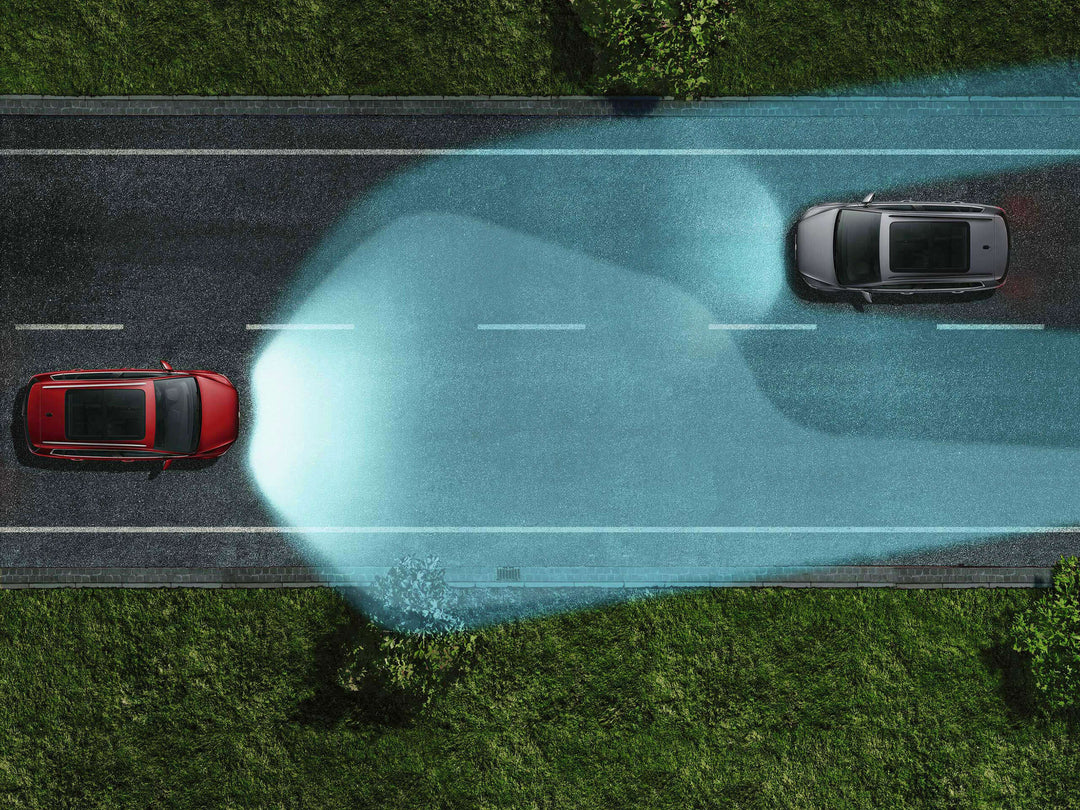
Unlike standard Light Assist—which simply turns your high beams completely on or off when it sees another car—DLA uses the front windshield camera to track other vehicles. It then dynamically adjusts the physical projector lenses and masks out specific sections of the light beam.
This creates a shifting "shadow box" directly around oncoming or preceding traffic so you do not blind them, while keeping the rest of the road fully illuminated by high beams. It also reduces glare from highly reflective road signs and actively steers the light around corners.

This is an informational page. To purchase this product, please visit the VW Feature Activation Suite using the button below.

Products are direct shipped from Supplier.

This site is protected by hCaptcha and the hCaptcha Privacy Policy and Terms of Service apply.

Description

This service will activate the full Dynamic Light Assist (DLA) headlight functionality.


This feature utilizes the Auto High beam from the vehicle and will dynamically turn and move the Physical Projector Lenses to mask oncoming drivers or drivers in front of the vehicle from being blinded. Added bonus…when turning it will throw light around the corner to light up the area ahead. It will adjust the LEDs and projectors in different conditions ie rain, highway, rural, urban, etc.

Now you can have the function activated on your US model New Atlas!


Applies to:

2024 VW Atlas w/ Auto High Beams


Questions about this activation can be found here:

Matrix/DLA FAQs Page


This service can be done remotely or in person.

Programming Requirements

1.  Computer or Android phone (Laptop is preferred, but desktop may be used if you can place it near your car for the process)


  • Windows: 7, 8, 10, or 11
  • macOS: 10.15 or newer. Must have Apple silicon processor. Intel-based Macs do not work.
  • Linux: Ubuntu 20.04 or newer
  • Android: 5.0 or newer. Device must allow USB device sharing and have USB-C.


2.  Remote programming cable - This can be added to your purchase above.


3.  A stable internet connection


4.  OBDeleven with Pro or Ultimate plan - for SFD unlocking


Recently viewed